
Статии:
- Контрол на достъпа
- Как да деактивирате влизането чрез социални медии
- Как да зададете логото (предварителен преглед) на проекта си за месинджъри
- Changing the project (cabinet) name and other public settings
- Добавяне на вашата оферта в платформата Kwiga
- Как да свържете допълнителен проект
- Как да зададете конкретен език за страница в Kwiga
- Известия, получавани от учениците
- Промяна на паролата и настройките за вход
- Промяна на лична информация
- Настройки на подателя и адрес за отговор
- Важни настройки
- Как да изтриете потребителски акаунт
- Страница за представяне на проекта (училището)
- Как да свържете собствен домейн/поддомейн
- Използване на променливи в проекта, списък с наличните променливи
- Свързване на персонализиран домейн (поддомейн) за изпращане на имейли
- Как да добавите публична информация за проекта и канали за контакт
- Настройки на профила на ученика
How to change the public data of an account, what it is, what it affects and where it is displayed.
В тази статия:
What is public data.
After registering on kwiga.com, users, as needed, have the ability to change the project name, public face and subdomain.
This is public data that clients and other kwiga users see on your school page, on product presentation pages, and when subscription or purchase of your products.
How to change public data
To change the data, in the upper right corner, click on the name of the project, and in drop-down menu, select the settings tab, then “Cabinet”
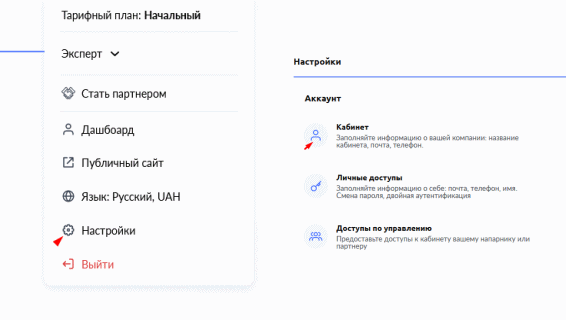
In this way, you go to the account menu, where all public data.

Let's take a closer look at each of the points.
Photo

You can add a photo or school logo here.
Account name

Here you can change the name of the project that will be displayed on the page with courses and in letters.
Account Public Face

Here you can change the name of the expert that will be displayed on the pages schools.
Important - in the paragraphs above, changes are saved automatically when you enter text in the field. </strong >
Subdomain

Used to give your page a unique name on the web. Change the name of the subdomain to whatever you want, and click the save button. If you don't want to use a subdomain on kwiga.com, you can connect your own domain
Attention! After editing the subdomain, all old links products will become unavailable!
Не намерихте отговора? Свържете се с екипа за поддръжка чрез онлайн чат или Telegram