
Άρθρα:
- Έλεγχος πρόσβασης
- Πώς να απενεργοποιήσετε τη σύνδεση μέσω κοινωνικών δικτύων
- Πώς να ορίσετε το λογότυπο (προεπισκόπηση) του έργου σας για εφαρμογές μηνυμάτων
- Changing the project (cabinet) name and other public settings
- Προσθήκη της προσφοράς σας στην πλατφόρμα Kwiga
- Πώς να συνδέσετε ένα επιπλέον έργο
- How to set a specific language for a page on Kwiga
- Ειδοποιήσεις που λαμβάνουν οι μαθητές
- Changing the password and login settings
- Changing personal information
- Sender settings and reply address
- Important settings
- Πώς να διαγράψετε έναν λογαριασμό χρήστη
- Σελίδα παρουσίασης έργου (σχολείου)
- Πώς να συνδέσετε το δικό σας domain ή subdomain
- Χρήση μεταβλητών στο έργο, λίστα διαθέσιμων μεταβλητών
- Σύνδεση προσαρμοσμένου domain (υποτομέα) για αποστολή email
- Πώς να προσθέσετε δημόσιες πληροφορίες έργου και κανάλια επικοινωνίας
- Ρυθμίσεις προφίλ μαθητή
How to change the password, what are the settings for access to a personal account and their options.
Σε αυτό το άρθρο:
Access Control
In order to get to the access control menu - in the upper right corner click on the name of the project, and in the drop-down menu, select the tab “Settings”, then “Cabinet”, menu item “Personal access” and subparagraph “Access control”

Change password
The first section of the menu allows, if necessary, to set a new password.

When you change your password, you must verify your identity. The confirmation code will sent to your email address.

Account Access
Below are the account access settings. Login options can be connected and change at any time, as needed.
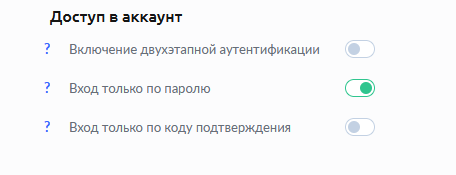
Two-Step Verification is the most secure security method account. Every time you log in to your KWIGA account, you will need to enter a password and a confirmation code that will be sent to your email address.
Password-only login - the classic version, is set initially during registration.
Sign in with confirmation code only - disables introductions password. Access to your personal account is provided only through the code confirmation that is sent to your email address when you log in kwiga.com
In order to connect in a convenient way for you - set the green slider next to the desired item.

Δεν βρήκατε απάντηση; Επικοινωνήστε με την υποστήριξη στην συνομιλία ή Telegram