
Články:
- Řízení přístupu
- Jak vypnout přihlášení přes sociální sítě
- Jak nastavit logo projektu (náhled) pro messengery
- Changing the project (cabinet) name and other public settings
- Přidání vaší nabídky na platformu Kwiga
- Jak připojit další projekt
- How to set a specific language for a page on Kwiga
- Oznámení, která studenti dostávají
- Changing the password and login settings
- Changing personal information
- Sender settings and reply address
- Important settings
- Jak smazat uživatelský účet
- Prezentace projektu (školy)
- Jak připojit vlastní doménu nebo subdoménu
- Používání proměnných v projektu, seznam dostupných proměnných
- Připojení vlastní domény (subdomény) pro odesílání e-mailů
- Jak přidat veřejné informace o projektu a kontaktní kanály
- Nastavení studentského profilu.
How to change the password, what are the settings for access to a personal account and their options.
V tomto článku:
Access Control
In order to get to the access control menu - in the upper right corner click on the name of the project, and in the drop-down menu, select the tab “Settings”, then “Cabinet”, menu item “Personal access” and subparagraph “Access control”

Change password
The first section of the menu allows, if necessary, to set a new password.

When you change your password, you must verify your identity. The confirmation code will sent to your email address.

Account Access
Below are the account access settings. Login options can be connected and change at any time, as needed.
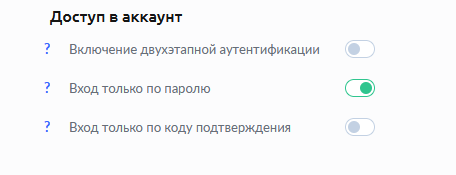
Two-Step Verification is the most secure security method account. Every time you log in to your KWIGA account, you will need to enter a password and a confirmation code that will be sent to your email address.
Password-only login - the classic version, is set initially during registration.
Sign in with confirmation code only - disables introductions password. Access to your personal account is provided only through the code confirmation that is sent to your email address when you log in kwiga.com
In order to connect in a convenient way for you - set the green slider next to the desired item.

Nenašli jste odpověď? Kontaktujte podporu prostřednictvím online chatu nebo Telegram