
"Thank you page" step
Learn where the buyer lands after a payment, a failed payment, or getting free access, and how to replace these pages with your own.
Thank you page is the last step of the funnel. The step has no link of its own: the buyer lands on it automatically after paying or getting access. In this step, you choose which page to send the buyer to in each case. For how the funnel works as a whole, see the article Sales funnels: what they are and how they work.
How to set up the pages
- Open Courses → Sales settings → Sales funnels and select the funnel.
- Select the Thank you page step and go to the Template tab.
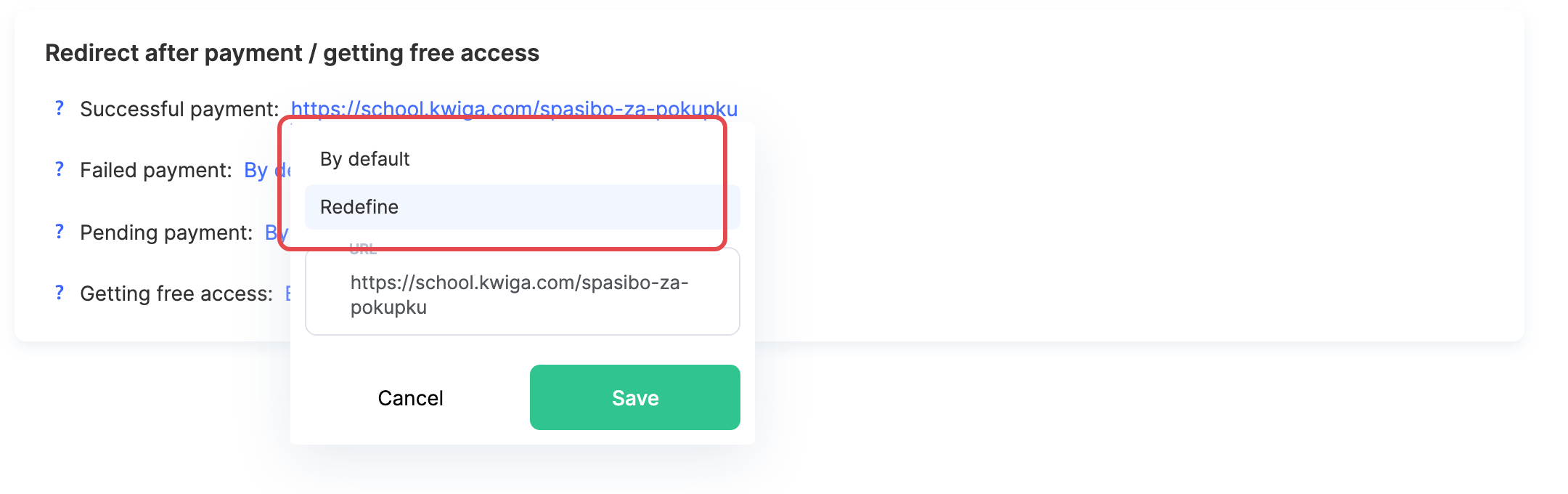
- In the Redirect after payment / getting free access block, set up the pages for the four outcomes.
The outcomes:
- Successful payment — the buyer has paid for the order.
- Failed payment — the payment didn't go through.
- Pending payment — the payment is still being processed.
- Getting free access — the buyer got access through a free plan.
For each outcome, choose:
- By default — the standard KWIGA page.
- Redefine — your own page. Enter its address in the URL field and save.
The Step preview button opens the list of outcomes: choose an outcome to view its page.
Which pages the buyer will see
KWIGA uses the settings of the funnel the buyer went through if that funnel sells the paid plan. If the buyer didn't come through such a funnel — for example, via a plan link — the settings of the plan's enabled plan funnel apply. If the plan has no plan funnel, the after-payment pages from the plan's earlier settings apply, if they were set; if the plan funnel exists but is disabled, the plan's earlier pages don't apply. Otherwise the settings of the enabled course funnel apply, but only if the plan is connected to a single course and that course has no other plans; in all other cases the buyer sees the standard KWIGA pages.
Note: if the previous step has no plans with connected payment systems, the buyer goes straight to the Getting free access page — the step warns you about this.
A/B testing the pages after payment
You can compare the pages after payment in an A/B test: each version of the step gets its own set of pages for all four outcomes. Learn more in the article A/B testing funnel pages.
Statistics
In the funnel analytics, the Thank you page step is broken down by outcome. Click an outcome to open the list of visits. Learn more in the article Funnel analytics.
Example: after a successful payment, you want to show the buyer a welcome video and a link to the course chat. Create such a page, for example on a mini landing page, then for the Successful payment outcome choose Redefine and paste its address into the URL field. Leave By default for the Failed payment outcome — the buyer will see the standard KWIGA page.
Frequently asked questions
Which pages will the buyer see after payment if they purchased through a plan link rather than a funnel?
The settings of this plan's enabled sales funnel apply. Otherwise, the following settings apply in order:
- if the plan has no sales funnel – the post-payment pages from the plan's previous settings, if any were configured;
- otherwise – the course funnel settings, but only if the plan is linked to one course and the course has no other plans;
- in all other cases – the default KWIGA pages.
The settings of the funnel the buyer went through apply only if it sells the plan they paid for.
Why is the buyer taken directly to the "Get free access" page?
This happens when the previous step has no plans with connected payment systems: the buyer will go straight to the "Get free access" page. A tooltip in this step warns you about this.
Can I replace only the successful payment page with my own and keep the other pages as default?
Yes. Choose an option for each outcome separately: for "Successful payment", select "Override" and enter the address in the "URL" field. For the other outcomes, leave "Default" selected – the buyer will see the standard KWIGA page.
How can I preview the page shown after payment without making a payment?
Click "Preview step" to open the list of outcomes. Select an outcome to view its page.
Where can I see how many customers landed on each page after payment?
In funnel analytics, the “Thank you page” step is broken down by outcome. Click an outcome to view the list of visits.
Thanks for your feedback!
Thanks! We'll update the article. Need an answer now? Contact support